Tuesday, June 6, 2017

KnockoutJS - Dirty Check - Observable Pattern

KnockoutJS and Its observable feature which help us to track each field's changes and notify to user un-saved data before leaving screen.


KnockoutJS (KO) is basically a JS library that enables Declarative Bindings using an ‘Observable’ ViewModel on the html view and follow observer pattern approach, enable UI to bind and refresh itself automatically whenever the data bound is modified

KnockoutJS two way binding - Observer pattern


Here is an example of knockoutJS  - observer pattern:


HTML View notify to model JS object, if any change occurred vice versa


KnockoutJS - Dirty Check - Observable Pattern
Dirty Check Message


ViewModel Js File:

Here is a viewmodel js file, which has set of observable fields, which will be bind with view.

function ProductViewModel(model)
{
    this.Price = ko.observable(0);
    this.ID = ko.observable(model.ID);
    this.Name = ko.observable(model.Name);
    this.Email = ko.observable(model.Email);
    this.Price = ko.observable(model.Price);
    this.Product = {
        ID: this.ID(),
        Name: this.Name(),
        Email: this.Email(),
        Price: this.Price()
    };

    this.initialState = ko.toJSON(this.Product);
    this.isDirty = ko.computed(function () {
        this.Product = {
            ID: this.ID(),
            Name: this.Name(),
            Email: this.Email(),
            Price: parseFloat(this.Price())
        };

        var newvalue = ko.toJSON(this.Product);

        if (this.initialState !== newvalue) {
            return true;
        }
        else {
            return false;
        }
    });
}

ViewModel Binding with View:

Here is code, which explains how to bind the viewmodel with HTML view.

<script type="text/javascript">
    var submitted = false;
    $(document).ready(function () {
        submitted = false;
        var data = @Html.Raw(new System.Web.Script.Serialization.JavaScriptSerializer().Serialize(Model));
        ko.applyBindings(new ProductViewModel(data));
        $("form").submit(function () {
            submitted = true;
        });

        $(window).bind('beforeunload', function () {
            var dirty = $("#IsDirty").val();
            if (dirty == "true" && submitted == false) {
                return "You haven\'t saved your changes";
            }
        });
    }
    );
</script>

HTML View:

Here is an HTML code, which defines the layout of screen and define control on page.

@using (Html.BeginForm("DirtyView", "Home", FormMethod.Post, new { ID = "form", @class = "form-horizontal" }))
{
    @Html.ValidationSummary(false, "Please resolve the following errors and click'Save Changes' again :",
    new { @class = "alert alert-danger" })
    @Html.HiddenFor(m => m.ID)

    <input type="hidden" data-bind="value : IsDirty" id="IsDirty" />
    <div class="form-group">
        @Html.LabelFor(m => m.Name, new { @class = "control-label col-sm-2" })
        <div class="cpl-sm-10">
            @Html.TextBoxFor(m => m.Name, new { data_bind = "value: Name", @class = "form-control" })
        </div>
    </div>
    <div class="form-group">
        @Html.LabelFor(m => m.Email, new { @class = "control-label col-sm-2" })
        <div class="cpl-sm-10">
            @Html.TextBoxFor(m => m.Email, new { data_bind = "value: Email", @class = "form-control" })
        </div>
    </div>
    <div class="form-group">
        @Html.LabelFor(m => m.Price, new { @class = "control-label col-sm-2" })
        <div class="cpl-sm-10">
            @Html.TextBoxFor(m => m.Price, new { data_bind = "value: Price", @class = "form-control" })
        </div>
    </div>
    <div class="form-group">
       <div class="col-sm-offset-2 col-sm-10">
           <button type="submit" class="btn, btn-success">Submit</button>
       </div>
    </div>
    <p>Dirty : <strong data-bind="text: IsDirty"></strong></p>
    <div>
        <strong>OLD Product</strong>
        <span data-bind="text: initialState"></span>
    </div>
}


Thanks for Visiting!!

Friday, January 20, 2017

Custom Objects Sorting in C#

Sorting the item in collection is very easy steps, simply call Sort() method on the collection and item will be sorted .
But this Sort() method only works for primitive type of collection (example int, decimal etc.).

Here is an example of sorting a collection of integer items

 List<int> collections = new List<int> { 34, 3, 54, 5, 74, 14, 425 };

Iterates the items and see original item order

Console.WriteLine("Before Sorting");

foreach (int item in collections)
        {
              Console.WriteLine(item);
        }


Output:


After calling sort () method on collection

 Console.WriteLine("After Sorting");
 collections.Sort();
 foreach (int item in collections)
        {
              Console.WriteLine(item);
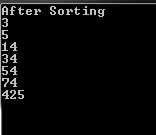
         }


Output:


By using IComparable interface

When you want to sort the custom object, you have to implement IComparable interfere which allows custom sorting of objects when implemented. When a class implements this interface, we must add the public method CompareTo(T). We implement custom sorting for a class with IComparable.

Here is a custom object StateInfo, which uses IComparable interface for sorting:

public class StateInfo : IComparable<StateInfo>
                        {
    public string contact;
    public DateTime date;
    public string action;

    public int CompareTo(StateInfo value)
    {
        return this.date.CompareTo(value.date);
    }
}

As per above code, by default sorting will be  'date' field, if you want to sorting based on contact instead of date then modify above CompareTo function code

    public int CompareTo(StateInfo value)
    {
        return this.contact.CompareTo(value.contact);
    }

Main Programming Code:

private static void ArraySort()
    {
        var _allStatInfo = new List();

        _allStatInfo.Add(new StatInfo { contact = "HCL", date = DateTime.Today, action = "PUT" });
        _allStatInfo.Add(new StatInfo { contact = "TCS", date = DateTime.Today.AddDays(3), action = "POST" });
        _allStatInfo.Add(new StatInfo { contact = "Infy", date = DateTime.Today.AddDays(-5), action = "GET" });

        _allStatInfo.ForEach(x => Console.WriteLine(x.contact));

        // this now sorts by date
        _allStatInfo.Sort();

        _allStatInfo.ForEach(x => Console.WriteLine(x.contact));

    }

Custom Object Sort


By using Delegate to Anonymous Method: 

In C#, we can also sort the collection of custom object with help of Delegate/Anonymous method

         var arr = _allStatInfo.ToArray();
          Array.Sort(arr, delegate (StatInfo a, StatInfo b)
            {
                return a.date.CompareTo(b.date);
            });

Other Links:     
Thanks for Visiting!!


Thursday, January 14, 2016

SQL Pivot function

SQL Pivot function helps us to combine and compare of larger amount of data and it transfer the data from rows into columns and it will helpful in writing for cross-tabulation output.

Syntax : 

SELECT
Non-PIVOT AND PIVOT COLUMNS
FROM
    (
        PIVOT DATA  eg. Select Query 
    ) 
    AS   
PIVOT
(
   aggregation function eg. SUM, Avg or Max 

FOR 
[]   
    IN ( SETS OF PIVOT COLUMNS)
) AS   
;
Here is an example of SQL Pivot operator how does it convert the each employee hours as task wise report

EMP Table:  It contains employee records
                                                                 
EMP_ID
EMP_NAME
1
SLOOPY JOE
2
BILL GATES        
3
FRED FLINTSTONE

TASK Table: It is lookup table for task

TASK_CD
TASK_DESC
A
ADMIN
D
DESIGN        
C
CODING
F
FUNCTION TEST
Q
QA


EMPLOYEEHOURS: This table contains daily employee hours as task wise

DATE
EMP_ID
TASK_CD
HOURS
4/1/2013
1
D
10
4/2/2013
1
C
8
4/3/2013
1
C
8
4/4/2013
1
F
8
4/5/2013
1
C
8
4/7/2013
1
Q
8
4/1/2013
2
C
10
4/2/2013
2
C
8
4/3/2013
2
C
8
4/4/2013
2
C
8
4/5/2013
2
Q
8
4/7/2013
2
C
8
4/8/2013
2
C
8
4/1/2013
3
Q
10

Below SQL Script is used to calculate each employee’s task hours for Design, Coding, Functional Testing and QA by using SQL Pivot operator and generate below tabular report:

To write the SQL Pivot, we need to perform the two steps:

1.    Create either sub-query or CTE which fetch records which is being pivoting.
2.    Apply the PIVOT operator

SQL Pivot function

Generated Tabular Report:

EMPOYEE ID
NAME
DESIGN
CODING
FUNCTIONAL TEST
QA
2
BILL GATES              
0
50
0
8
3
FRED FLINTSTONE          
0
0
0
10
1
SLOOPY JOE              
10
24
8
8

Thursday, January 7, 2016

Angularjs Model or Popup window by ngDialog API

ngDialog  API is used to provide Popup and Model window for Angulajs application. This API has open() method to open dialog window or creates new dialog instance.

.open (options):

This method is used to open dialog window, creates new dialog instance on each call. It accepts options object as the only argument.
       
 ngDialog.open({
                template: ‘url’,
                className:’cssStyle’,
                scope: $scope,  --->  pass current controller scope object to dialog
                showClose: false,
                overlay: true,
                closeByEscape: false,
            });

additional source : https://github.com/likeastore/ngDialog
Other angular related blogs :

Thanks for Visiting !!

SQL Server - Identify unused indexes

 In this blog, we learn about the index usage information (SYS.DM_DB_INDEX_USAGE_STATS) and analyze the index usage data (USER_SEEKS, USER_S...